
Girls · AI photo prompt
Marketing Agency Banner Prompt – Professional Services Poster in Gemini & ChatGPT
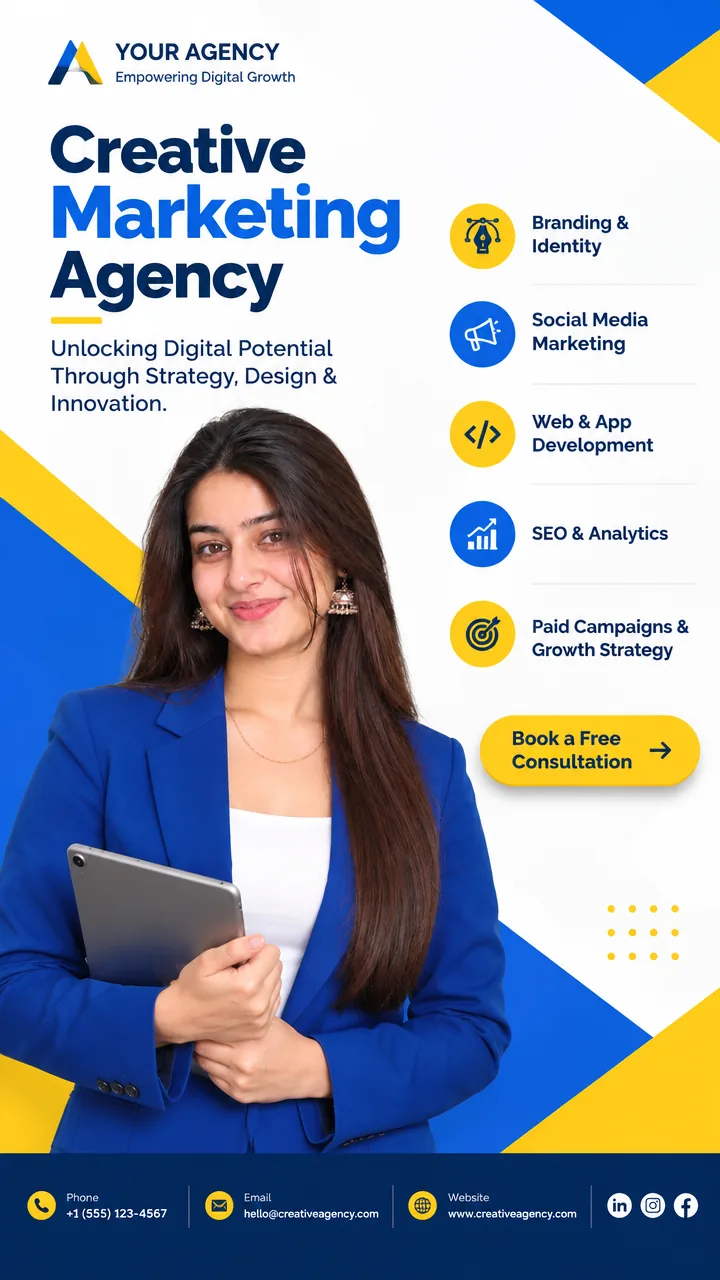
This Marketing agency banner prompt turns your photo into a borderless, high-end marketing-agency banner – you in a sharp blue blazer holding a tablet, a clean white-blue-yellow geometric background, an agency slogan, a bold “Creative Marketing Agency” header, service icons (branding, social media, web, SEO, ads) and a contact bar. Copy the prompt, upload your photo in Gemini or ChatGPT and get a ready business banner in seconds.
The prompt
3 more business banner ideas
Same professional banner style – for a different business each time.
Salon Business Banner Prompt
Fitness Coach Banner Prompt
Tuition Classes Banner Prompt
Agency founder DP prompt
A square close-up made for your WhatsApp or Instagram profile picture.
Business captions
Your photo is ready – now pick a caption. Tap Copy and paste it on Instagram.
- Let's grow your brand 📈
- Your business, our strategy 💼
- Strategy. Design. Growth. ✨
- DM for collaborations 📩
- Your digital partner 🤝
- Turn your brand into a real brand 🔥
- Results that speak 📊
- Now taking new clients 🚀
- Creativity meets data 💡
- Link in bio for services 🔗
- #MarketingAgency #DigitalMarketing #BusinessBanner #SmallBusiness #AIPhoto #GeminiAI #ChatGPT #Entrepreneur #PhotoPrompt
Turn your banner into a promo video
Made your photo? Bring it to life as a short reel. Upload the photo you just made in Gemini, tap Video, paste this prompt and send.
How to use this marketing agency banner prompt in Gemini
- Open the Gemini app or gemini.google.com.
- Tap Copy prompt above.
- Tap + and upload one clear, front-facing photo of yourself.
- Paste the prompt and send. Your photo is ready in about 10–20 seconds.
- Not happy? Tap regenerate or change one detail in the prompt and try again.
How to use it in ChatGPT
- Open ChatGPT and start a new chat.
- Attach your photo with the + button.
- Paste the prompt, send it and wait for the image.
- Tap the download icon to save it.
Tips for the best business banner
- Use a sharp photo where your full face is visible – no sunglasses, mask or heavy filter.
- For an Instagram post write vertical 3:4; for a story or reel cover write vertical 9:16.
- Replace the sample agency name, slogan and contact details with your own.
- Check every word of text in the result – banners have a lot of small text.
FAQ
Is this marketing agency banner prompt free?
Yes, the prompt is free. Gemini and ChatGPT both make images on their free plans, with a small daily limit.
Should I use Gemini or ChatGPT?
Both work. Gemini is quicker and usually keeps your face closer to the photo; ChatGPT takes longer but the light and detail can look richer. Run it in both and pick your favourite.
My face looks different in the result. What should I do?
Upload a clear, front-facing photo in good light without sunglasses or filters, and add "keep my face exactly the same as the uploaded photo" at the start of the prompt. Then generate again.
Can I make a video from this photo?
Yes. First make your photo with the prompt, then upload that photo in Gemini, choose Video and paste the video prompt from this page. Free plans have a small daily video limit.