We Are Hiring Poster Prompt – Friendly Recruitment Post for Girls in Gemini & ChatGPT
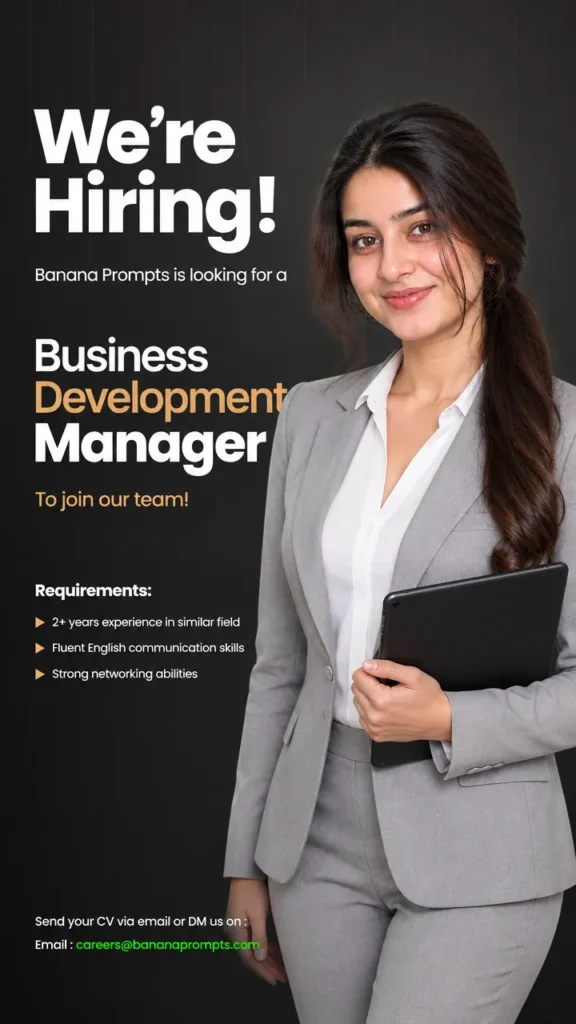
This We are hiring poster prompt turns your selfie into a professional recruitment poster – you on the right side at a welcoming three-quarter angle, a warm approachable smile, and clean space on the left for “We’re Hiring”, the role and how to apply. Copy the prompt, upload your photo in Gemini or ChatGPT and get a ready hiring post in seconds.
The prompt
Edit this image with the following specifications: Create a professional recruitment poster featuring a confident woman aged 24-28 years old with a warm, approachable demeanor. She should be positioned on the right side of the composition, occupying approximately 40-45% of the frame width, standing at a 3/4 angle with her body turned slightly toward the viewer's left while her face is angled directly toward the camera, creating an engaging, welcoming presence.
FACIAL FEATURES & APPEARANCE:
Warm brown eyes with natural, well-groomed eyebrows - slightly arched and defined
Natural-looking peachy-pink lip color with subtle gloss, displaying a gentle, confident smile (not overly cheerful)
Medium to tan complexion with smooth, flawless skin - professional makeup with subtle contouring
Face structure: defined cheekbones, soft jawline, rounded chin
Hair: Long, dark brown/black hair (length mid-back), styled in a sleek side-swept low ponytail or half-up hairstyle, with 2-3 soft waves or slight curls at the ends, some delicate wispy strands framing the face near cheekbones
Hair texture: silky, well-maintained, with a subtle natural shine
CLOTHING & STYLING:
Tailored, structured light gray blazer (pantone: cool light gray #C0C0C0) with perfectly fitted shoulders, showing professional silhouette
Blazer collar: notch lapels with clean lines, pressed and crisp
Blazer fit: fitted through the torso, nipped at the waist to suggest feminine shape, length ending at hip
Under the blazer: pristine white dress shirt/blouse (pure white) with:
Soft V-neckline (not too deep, professional depth)
Structured collar that peaks above the blazer collar
Long sleeves with tailored fit at wrists
Subtle fabric texture with slight sheen
No visible accessories or jewelry (keep it minimal and professional)
POSTURE & POSITIONING:
Posture: Upright, shoulders relaxed and back, displaying confidence without rigidity
Stance: Standing with weight slightly shifted to the right leg, left leg relaxed
Left arm: Bent at approximately 90-degree angle, hand holding a sleek black digital tablet/clipboard (modern, minimalist design) at waist/lower chest level, held horizontally
Right arm: Relaxed naturally at her side or with hand partially visible at the edge of frame
Head tilt: Slight, natural tilt toward the left shoulder, creating approachability
Eye gaze: Direct at camera, warm and engaging, conveying competence and trustworthiness
LIGHTING & SHADOWS:
Lighting direction: Soft studio lighting from upper left, creating subtle shadows that define facial features without harshness
Skin: Well-illuminated with natural-looking highlights on cheekbones, forehead, and bridge of nose
Eyes: Bright and clear with gentle catch lights reflecting professionalism
Shadow placement: Subtle shadows under cheekbones for definition, soft shadow under jaw, no harsh shadows
Overall tone: Warm, professional studio lighting with minimal harsh contrast
BACKGROUND:
Color: Deep charcoal to dark gunmetal gray gradient (approximately #2A2A2A to #1A1A1A), transitioning slightly from darker at edges to marginally lighter near the figure
Texture: Subtle vertical grid pattern overlaid (very faint, opacity ~5-10%), adding modern corporate aesthetic without overwhelming
Blur/Depth: Soft, subtle out-of-focus quality maintaining professional studio feel
Vignetting: Extremely subtle darkening at corners and edges to draw focus to the figure
TYPOGRAPHY & TEXT ELEMENTS:
Main Heading (Left side, upper):
Text: "We're Hiring!"
Font: Bold, modern sans-serif (similar to Poppins Bold or Montserrat Bold)
Size: Extra large, approximately 18-20% of image height
Color: Bright white (#FFFFFF)
Kerning: Tight, professional spacing
Position: Upper left quadrant, starting approximately 8% from left edge, 10% from top
Subheading (Below main heading):
Text: "Banana Prompts is looking for a"
Font: Light to Regular weight sans-serif (Poppins Light or similar)
Size: Small to medium (approximately 3-4% of image height)
Color: White (#FFFFFF)
Opacity: 100%
Position: Directly below "We're Hiring!"
Job Title (Central left, middle):
Text: "Business Development Manager"
Font composition:
"Business" - Regular weight, white (#FFFFFF)
"Development" - Same weight, GOLD/AMBER color (#D4A574 or similar warm gold)
"Manager" - Bold weight, white (#FFFFFF), slightly larger than other words
Size: Large, approximately 14-16% of image height
Kerning: Professional spacing
Position: Centered in left portion, middle-lower area
Supporting text (Below job title):
Text: "To join our team!"
Font: Light sans-serif, gold/amber color (#D4A574)
Size: Small (approximately 2.5% of image height)
Position: Directly below "Manager"
Requirements Section (Lower left):
Heading: "Requirements:" - White, bold, small size
Bullet points:
"2+ years experience in similar field"
"Fluent English communication skills"
"Strong networking abilities"
Font: Light to Regular sans-serif, white, small size (approximately 2% of image height)
Bullet style: Small arrow/triangle symbols (►)
Line spacing: 1.6-1.8
Position: Lower left, starting approximately 25% from top
Contact Section (Bottom left):
Text: "Send your CV via email or DM us on :"
Font: White, regular weight, small size
Color: White (#FFFFFF)
Below that: "Email : [email protected]"
"Email" text: White
Email address: Bright lime green (#00FF14 or #39FF14)
Position: Bottom left area, approximately 5% from bottom
OVERALL COMPOSITION & BALANCE:
Left side (60%): Text hierarchy and messaging
Right side (40%): Professional portrait of woman
Visual weight: Balanced, with figure anchoring the right side
White space: Minimal, professional layout with breathing room
Contrast: High contrast between text and background for readability
TECHNICAL SPECIFICATIONS:
Resolution: 1200x1500px (or proportional to original)
Aspect ratio: Vertical portrait format
Color palette: Dark charcoal background, white primary text, warm gold accents, natural skin tones
Style: Modern, minimalist, professional corporate aesthetic
Photography style: Professional studio portrait quality
Depth of field: Sharp focus on subject, subtle background blur
3 more recruitment post ideas
Same friendly professional style – a new message each time.
Join Our Team Poster Prompt
Use my uploaded photo and keep my face exactly the same. Recruitment poster with me holding a tablet and smiling on the right, bold text “JOIN OUR TEAM” on the left, clean blue-and-white design. Bright professional light, square 1:1.
Internship Poster Prompt
Use my uploaded photo and keep my face exactly the same. Poster with me in a casual blazer pointing at the text “INTERNSHIP OPEN”, colourful minimal shapes, space for details below. Friendly bright design, vertical 4:5.
Referral Poster Prompt
Use my uploaded photo and keep my face exactly the same. Poster with me giving a thumbs up, text “REFER A FRIEND”, handshake and star icons, clean green-and-white palette. Modern design, square 1:1.
Recruiter DP prompt
A square close-up made for your WhatsApp or Instagram profile picture.
Use my uploaded photo and keep my face exactly the same. Square professional headshot with a warm friendly smile, soft clean background, 1:1.
Hiring captions
Your photo is ready – now pick a caption. Tap Copy and paste it on Instagram.
Made your photo? Bring it to life as a short reel. Upload the photo you just made in Gemini, tap Video, paste this prompt and send.
Animate this poster into a short 8-second video. Keep my face exactly the same. I wave warmly and point to the text side, small icons pop in, the background gradient shifts softly. Bright friendly light, smooth motion, vertical 9:16.
How to use this we are hiring poster prompt in Gemini
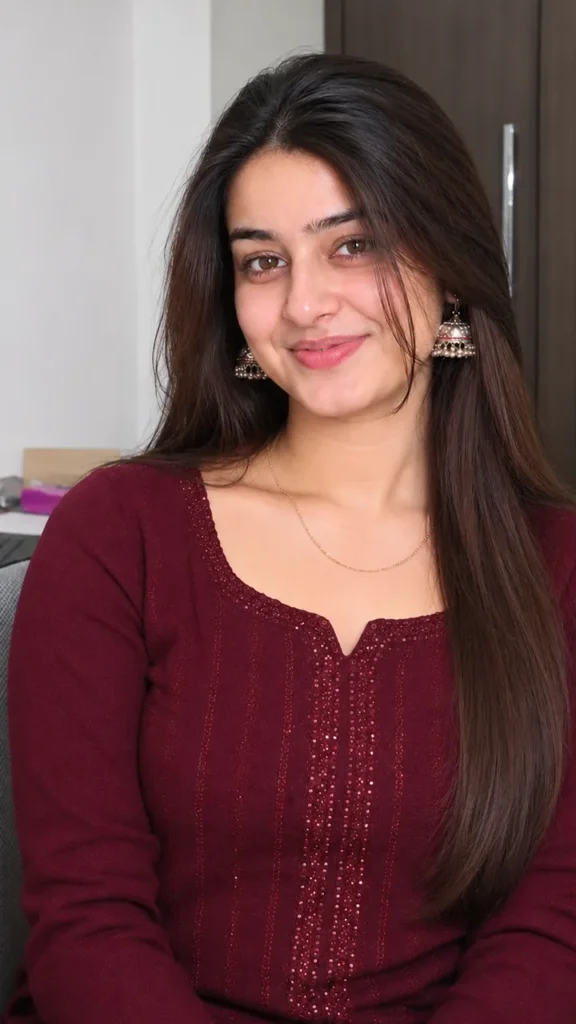
Pick a selfie in daylight with your face straight to the camera; side angles change the face more.
For an Instagram post write vertical 3:4; for a story or reel cover write vertical 9:16.
The prompt describes a sample age and eye colour – change them to you.
Add the job title and email in the prompt, and check spelling before posting.
FAQ
Is this we are hiring poster prompt free?
Yes. Copy it for free and use it in the free version of Gemini or ChatGPT. Free accounts may have a daily image limit.
Should I use Gemini or ChatGPT?
Both work. Gemini is quicker and usually keeps your face closer to the photo; ChatGPT takes longer but the light and detail can look richer. Run it in both and pick your favourite.
Why does the face not look like me?
Usually the photo is too small, dark or taken from the side. Use a sharp, front-facing selfie and write "do not change my face" at the start of the prompt, then try again.
Can I make a video from this photo?
Yes. First make your photo with the prompt, then upload that photo in Gemini, choose Video and paste the video prompt from this page. Free plans have a small daily video limit.