3D Grid
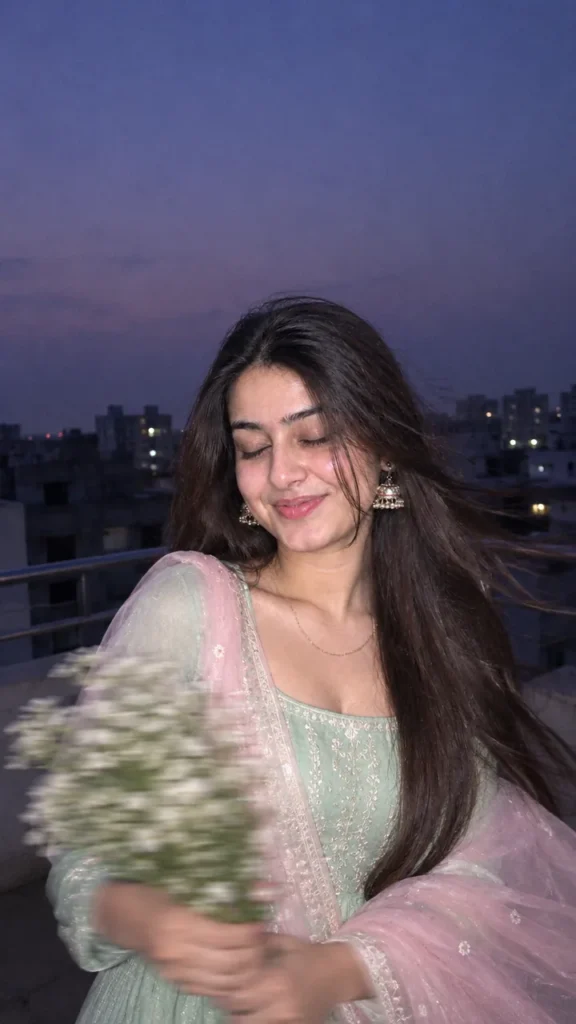
Motion blur flowers photo prompt – candid close-up of a woman on an urban rooftop with blurred moving flowers in the foreground, AI photo
AI photo
See it on the wall in the 3D gallery

Girls · AI photo prompt

Motion Blur Flowers Photo Prompt – Candid Rooftop Flower Portrait in Gemini & ChatGPT

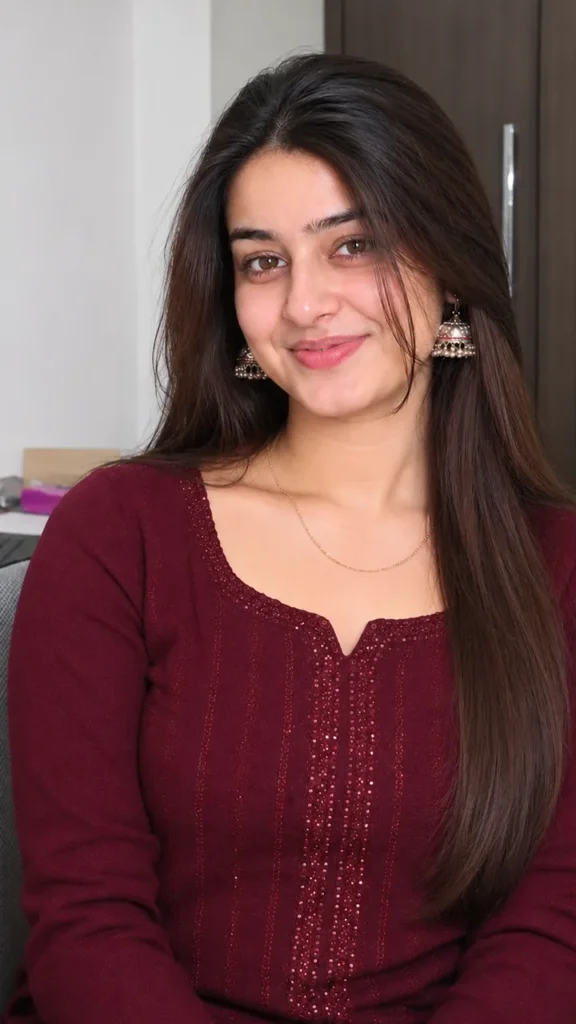
This Motion blur flowers photo prompt turns your photo into an aesthetic candid close-up – you on an urban rooftop, framed by flowers blurred in motion, with your face, skin texture and hairline kept exactly as they are. Copy the prompt, upload your photo in Gemini or ChatGPT and get a dreamy, artsy portrait in seconds.

The prompt

Use the uploaded photograph as the sole and highest-priority identity reference for the woman. Recreate the exact same woman shown in the uploaded image in this new scene. Her identity must remain unmistakably recognizable and consistent with the reference — exact facial identity and likeness, face shape and natural proportions, natural skin texture, and hairline must be preserved. Do not beautify, redesign, age, de-age, or reinterpret her face. Create an ultra-realistic candid close-up portrait of the same woman standing on an urban rooftop during blue hour. Her body is slightly turned away from the camera, eyes softly closed in a natural, peaceful candid moment. She holds a bouquet of small delicate white flowers close to her body, with strong natural motion blur on her hands and the flowers as though captured spontaneously mid-movement, while her face stays sharp and recognizable. She wears a pastel mint-green traditional Anarkali with a sheer baby-pink dupatta draped around her shoulders, moving naturally with the evening breeze. Long hair flows naturally in the wind. Set at blue hour with a dusky lavender-purple sky transitioning into darker blue tones, lit with a direct on-camera early-2000s digital-camera flash — bright flash on the subject, realistic falloff, background noticeably darker. Urban rooftop background with distant apartment buildings, metal railings and city lights beginning to appear, kept soft and darker so she remains the focal point. Photographic style: authentic early-2000s consumer digital-camera look, natural facial texture, mild digital grain, subtle JPEG-era softness, imperfect candid framing, realistic lens rendering — no modern smartphone computational photography, no HDR, no plastic skin, no beauty filter. Compose vertically as a smartphone lockscreen wallpaper with clean negative space at the top for lockscreen UI elements.

3 more motion blur flower ideas

Same dreamy motion-blur style – a new flower moment each time.

Bouquet Spin Blur Prompt

Use my uploaded photo and keep my face exactly the same. Candid close-up spinning with a bouquet of pink flowers, petals and bouquet in motion blur, my face sharp and laughing. Soft daylight, rooftop city behind, vertical 4:5.

Flower Field Blur Prompt

Use my uploaded photo and keep my face exactly the same. Close portrait in a field of wildflowers swaying in the wind, flowers blurred in the foreground, my face sharp, hair moving. Golden-hour light, dreamy, vertical 4:5.

Petal Rain Blur Prompt

Use my uploaded photo and keep my face exactly the same. Rose petals fall in a motion-blur streak across the frame in front of my face, eyes closed, gentle smile. Soft warm light, artsy candid, vertical 4:5.

Flower blur DP prompt

A square close-up made for your WhatsApp or Instagram profile picture.

Use my uploaded photo and keep my face exactly the same. Square close-up with blurred flowers in motion around my face, face sharp, soft daylight, 1:1.

Dreamy flower captions

Your photo is ready – now pick a caption. Tap Copy and paste it on Instagram.

  • Blooming in motion 🌸
  • Even the flowers are dancing 💃
  • Soft focus, sharp heart 💗
  • Petals in the breeze 🌷
  • Rooftop and roses 🌹
  • Flowers in the breeze, a glow on my face ✨
  • Dreamy days only ☁️
  • Life moves, I bloom 🌼
  • Blur the world, keep the smile 😊
  • Flower girl energy 🌺
  • #MotionBlur #FlowerPortrait #DreamyEdit #AestheticGirl #AIPhoto #GeminiAI #ChatGPT #ArtsyPhoto #PhotoPrompt

Turn your photo into a dreamy reel

Made your photo? Bring it to life as a short reel. Upload the photo you just made in Gemini, tap Video, paste this prompt and send.

Animate this photo into a short 8-second video. Keep my face exactly the same. Flowers sway and blur across the foreground in the breeze, my hair moves softly, I turn my eyes to the camera and smile. Soft daylight, dreamy motion, no text, vertical 9:16.

How to use this motion blur flowers photo prompt in Gemini

  1. Open the Gemini app or gemini.google.com.
  2. Tap Copy prompt above.
  3. Tap + and upload one clear, front-facing photo of yourself.
  4. Paste the prompt and tap send – the picture comes back in a few seconds.
  5. If something looks off, ask Gemini to fix just that part, for example "keep my face the same, make the light warmer".

How to use it in ChatGPT

  1. Open ChatGPT and start a new chat.
  2. Attach your photo with the + button.
  3. Paste the prompt, send it and wait for the image.
  4. Tap the download icon to save it.

Tips for the best flower blur portrait

  • Pick a selfie in daylight with your face straight to the camera; side angles change the face more.
  • For an Instagram post write vertical 3:4; for a story or reel cover write vertical 9:16.
  • Name your favourite flowers – roses, tulips or marigolds.
  • Write “keep my face sharp, only flowers blurred” if the blur spreads too much.

FAQ

Is this motion blur flowers photo prompt free?

Yes. Copy it for free and use it in the free version of Gemini or ChatGPT. Free accounts may have a daily image limit.

Should I use Gemini or ChatGPT?

Both work. Gemini is quicker and usually keeps your face closer to the photo; ChatGPT takes longer but the light and detail can look richer. Run it in both and pick your favourite.

Why does the face not look like me?

Usually the photo is too small, dark or taken from the side. Use a sharp, front-facing selfie and write "do not change my face" at the start of the prompt, then try again.

Can I make a video from this photo?

Yes. First make your photo with the prompt, then upload that photo in Gemini, choose Video and paste the video prompt from this page. Free plans have a small daily video limit.
More prompts like this

More Girls prompts

See all