Flower Field Photo Collage Prompt – Viral Sunny Spring 3-Panel Edit in Gemini & ChatGPT
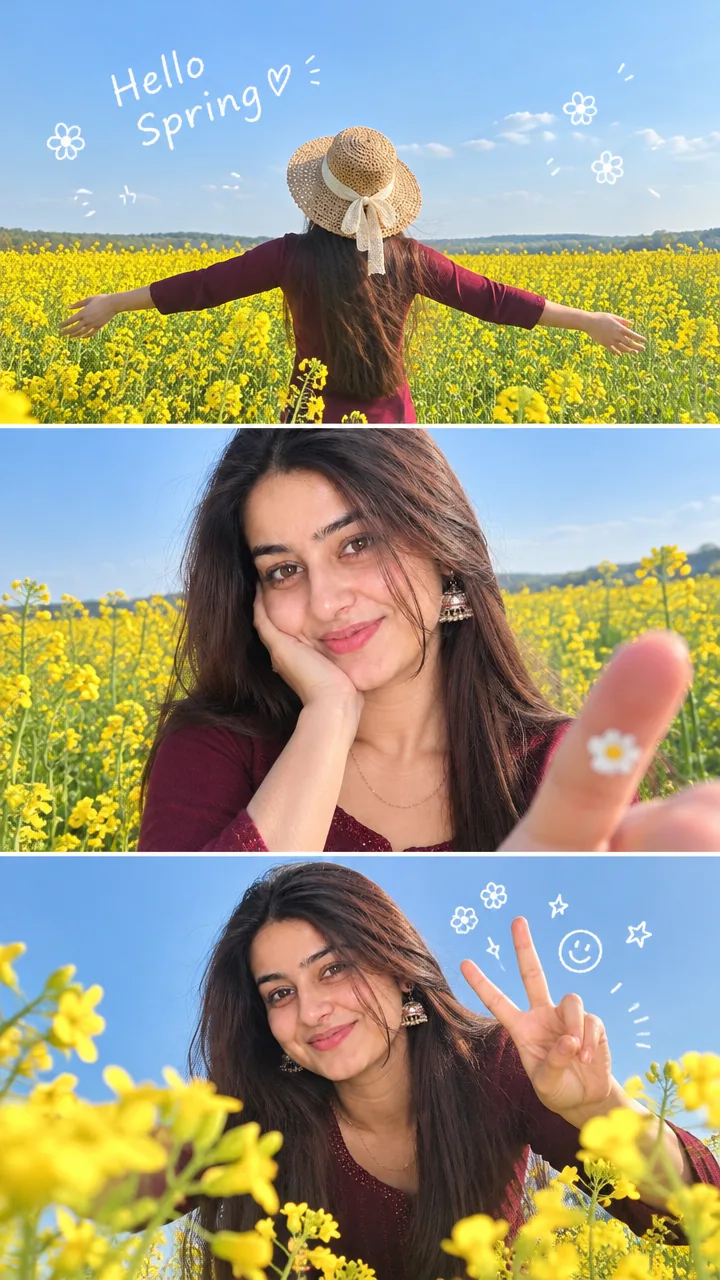
This Flower field photo collage prompt turns your photo into a bright, cheerful spring collage – three natural smartphone snapshots stacked vertically, all from the same sunny day in a flower field, with your face exactly the same in every panel. Copy the prompt, upload your photo in Gemini or ChatGPT and get the viral flower-field edit in seconds.
The prompt
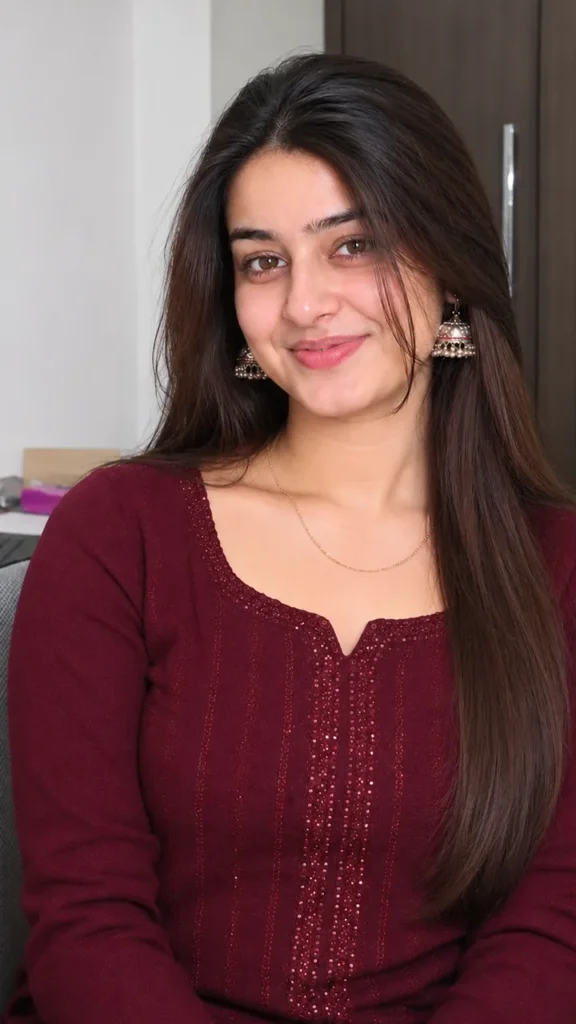
Use the uploaded reference image as the ONLY identity reference. Preserve the subject with absolute consistency across every panel. Keep the exact same facial features, skin tone, hairstyle, hairline, eyebrows, eye shape, nose, lips, face shape, body proportions, age, gender, expression, and overall appearance. Do not beautify, stylize, reinterpret, replace, or modify the person's identity in any way. Every frame must clearly depict the exact same individual.
Create a bright, cheerful spring-inspired photo collage arranged in a vertical 3-panel layout with a 3:4 aspect ratio. The final result should resemble three natural smartphone snapshots captured on the same sunny spring day, maintaining identical identity throughout all three panels.
Environment: An expansive field of blooming yellow rapeseed (canola) flowers beneath a crystal-clear blue spring sky. The atmosphere should feel peaceful, refreshing, joyful, warm, and filled with sunshine.
Lighting: Rich golden natural daylight, slightly overexposed highlights, bright airy exposure, soft yet vibrant color palette, natural outdoor shadows only, no studio lights or flash.
Panel 1 (Top): Capture the subject from behind while standing in the flower field. Arms comfortably stretched outward, wearing a woven straw hat, facing the distant horizon, hair and clothing gently moving in the spring breeze, conveying a carefree feeling of freedom and happiness. White handwritten doodle-style lettering floating naturally in the sky, with small hand-drawn flower doodles scattered near the clouds.
Panel 2 (Middle): Create a close-up smartphone portrait. The subject naturally rests one side of the face on one hand while smiling softly. The opposite hand reaches toward the camera using realistic forced perspective, with a tiny flower sticker attached to one finger. Warm eye contact or a joyful natural smile, relaxed candid expression.
Panel 3 (Bottom): Capture a playful low-angle portrait through the flowers. The subject leans toward the camera while making a peace sign, with genuine candid laughter and a fun, energetic pose. Cute doodle flowers, stars, smiley faces, and hand-drawn icons surround the raised fingers.
Outfit: Keep the clothing identical to the uploaded reference image whenever possible. If slight wardrobe adjustments are required to better suit the spring environment, use clothing that closely matches the original style while preserving the person's overall appearance and identity. Optional styling: straw hat, soft pastel clothing, comfortable casual outfit, minimal natural accessories.
Hair: Maintain the exact hairstyle shown in the reference image. Allow only subtle movement created by the wind. Do not alter hair length, hair color, hair texture, haircut, or hairstyle.
Camera: Authentic smartphone photography, handheld capture, eye-level framing (Panels 1 and 2), low-angle framing (Panel 3), natural composition, lifestyle documentary photography, subtle real smartphone lens imperfections, authentic smartphone depth of field.
Visual Style: Ultra-photorealistic, RAW photograph, natural skin pores, realistic individual hair strands, detailed clothing textures, soft glow, gentle highlight bloom, hybrid film-and-digital appearance, high saturation balanced with soft pastel tones, Korean/Japanese lifestyle magazine aesthetic, editorial lifestyle photography, dreamy while remaining realistic. Should appear completely authentic and indistinguishable from a real photograph — not AI-generated.
Mood: Springcore, youthful, playful, carefree, fresh, dreamy, sunny, cute, warm, natural happiness.
Negative Prompt: AI-generated appearance, CGI, 3D render, illustration, anime, painting, plastic skin, doll-like face, beauty filters, excessive HDR, oversharpening, unrealistic flowers, artificial lighting, flash lighting, extra fingers, malformed hands, distorted anatomy, inconsistent facial features, identity changes, mismatched appearance between panels, blurry image, watermark, logo, unwanted text artifacts, oversaturated colors, artificial symmetry, unrealistic proportions, poor quality, low resolution.
3 more 3-panel collages
Same three-snapshot style – a new place each time.
Sunflower Field Collage Prompt
Use my uploaded photo and keep my face exactly the same. Vertical 3-panel collage in a sunflower field: walking with a sun hat, close-up smiling with a sunflower, sitting among the flowers. Golden afternoon sun, natural phone snapshots, 3:4.
Tulip Garden Collage Prompt
Use my uploaded photo and keep my face exactly the same. 3-panel collage in a tulip garden: running between rows of red and yellow tulips, holding a tulip bouquet, a laughing close-up. Bright spring light, candid phone style, 3:4.
Mustard Field Collage Prompt
Use my uploaded photo and keep my face exactly the same. 3-panel collage in a yellow mustard field: arms open wide, dupatta flying, a shy smile close-up. Bright Punjab winter sunshine, natural smartphone look, 3:4.
Flower field DP prompt
A square close-up made for your WhatsApp or Instagram profile picture.
Use my uploaded photo and keep my face exactly the same. Square profile picture smiling among colourful spring flowers, soft sunlight, natural phone-photo look, 1:1.
Spring captions for Instagram
Your photo is ready – now pick a caption. Tap Copy and paste it on Instagram.
Made your photo? Bring it to life as a short reel. Upload the photo you just made in Gemini, tap Video, paste this prompt and send.
Animate this collage into a short 8-second video. Keep my face exactly the same in every panel. Flowers sway in a light breeze in all three frames, my hair moves, I smile and turn in each panel one after another. Bright sunny light, smooth motion, vertical 9:16.
How to use this flower field photo collage prompt in Gemini
Tap + and upload one clear, front-facing photo of yourself.
Paste the prompt and send. Your photo is ready in about 10–20 seconds.
Not happy? Tap regenerate or change one detail in the prompt and try again.
How to use it in ChatGPT
Open ChatGPT (the free plan works) and start a new chat.
Tap + and add your photo.
Paste the prompt and send – image generation takes up to a minute.
Long-press or tap download to save the picture.
Tips for the best flower collage
Use a sharp photo where your full face is visible – no sunglasses, mask or heavy filter.
Change the size at the end of the prompt: 1:1 for a DP, 3:4 for a post, 9:16 for a story.
Name the flowers you love – lavender, roses or marigold.
Ask for 4 panels if you want one more pose.
FAQ
Is this flower field photo collage prompt free?
Yes, the prompt is free. Gemini and ChatGPT both make images on their free plans, with a small daily limit.
Which is better for this prompt – Gemini or ChatGPT?
Gemini keeps the face closer to your photo and is faster. ChatGPT often gives softer, more cinematic light. Try both and keep the one you like.
My face looks different in the result. What should I do?
Upload a clear, front-facing photo in good light without sunglasses or filters, and add "keep my face exactly the same as the uploaded photo" at the start of the prompt. Then generate again.
Can I make a video from this photo?
Yes. First make your photo with the prompt, then upload that photo in Gemini, choose Video and paste the video prompt from this page. Free plans have a small daily video limit.