Couple · AI photo prompt
Lakeside Flower in Hair Couple Prompt – Tender Love Edit in Gemini & ChatGPT
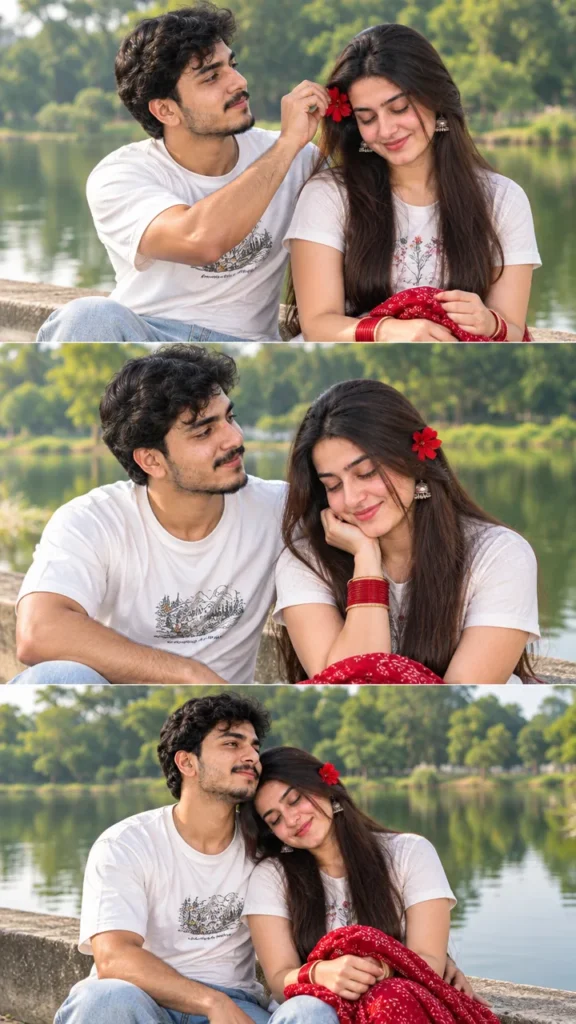
This Lakeside flower in hair couple prompt turns your photo into a tender lakeside love moment – the two of you sitting on a concrete embankment by a calm, tree-lined lake, he in a white tee and light jeans placing a red flower in her hair, she in a white printed tee with red bangles, looking down shyly with closed eyes. Copy the prompt, upload your photo in Gemini or ChatGPT and get a soft romantic picture in seconds.
The prompt
3 more lakeside love moments
Same calm lake romance – a new moment each time.
Lakeside Shoulder Rest Prompt
Lakeside Boat Prompt
Lakeside Walk Prompt
Lakeside couple DP prompt
A square close-up made for your WhatsApp or Instagram profile picture.
Tender love captions
Your photo is ready – now pick a caption. Tap Copy and paste it on Instagram.
- A flower for my flower 🌺
- A flower in your hair 💕
- Shy smiles, soft love 🥰
- Lakeside love story 🌿
- Little gestures, big love ❤️
- Love's first token 🌹
- Calm waters, warm hearts 💛
- Blushing is love too 🙈
- You and the lake and me 💑
- Simple moments, forever memories 📸
- #CoupleGoals #LakesideLove #RomanticMoment #LoveStory #AIPhoto #GeminiAI #ChatGPT #CouplePhoto #PhotoPrompt
Turn your photo into a love reel
Made your photo? Bring it to life as a short reel. Upload the photo you just made in Gemini, tap Video, paste this prompt and send.
How to use this lakeside flower in hair couple prompt in Gemini
- Go to gemini.google.com or open the Gemini app on your phone.
- Tap Copy prompt above.
- Tap + and upload one clear photo of you both together (or one photo of each of you).
- Paste the prompt and tap send – the picture comes back in a few seconds.
- If something looks off, ask Gemini to fix just that part, for example "keep my face the same, make the light warmer".
How to use it in ChatGPT
- Open ChatGPT and start a new chat.
- Attach your photo with the + button.
- Paste the prompt, send it and wait for the image.
- Tap the download icon to save it.
Tips for the best lakeside photo
- Two separate selfies work too: upload both and the prompt keeps each face.
- Change the size at the end of the prompt: 1:1 for a DP, 3:4 for a post, 9:16 for a story.
- Change the flower to jasmine or a rose for a different feel.
- Upload one photo of you two together for the most natural faces.
FAQ
Is this lakeside flower in hair couple prompt free?
Yes. Copy it for free and use it in the free version of Gemini or ChatGPT. Free accounts may have a daily image limit.
Which is better for this prompt – Gemini or ChatGPT?
Gemini keeps the face closer to your photo and is faster. ChatGPT often gives softer, more cinematic light. Try both and keep the one you like.
One of our faces changed. How do I fix it?
Use a photo where both faces are sharp and front-facing, or upload one clear photo of each person. Add "keep both faces exactly the same as the uploaded photos" at the start of the prompt and generate again.
Can I make a video from this photo?
Yes. First make your photo with the prompt, then upload that photo in Gemini, choose Video and paste the video prompt from this page. Free plans have a small daily video limit.