

Boys · AI photo prompt
Underwater Portrait Prompt for Boys – Cinematic Wallpaper with Light Ripples in Gemini & ChatGPT
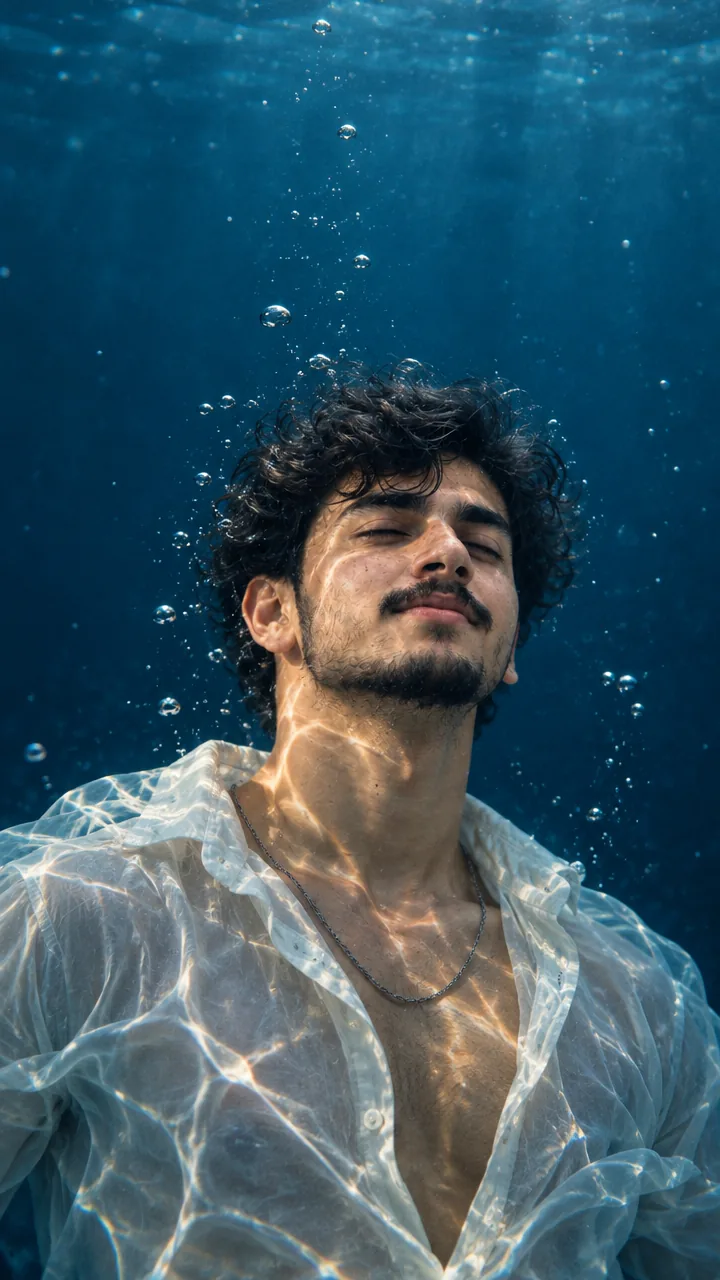
This Underwater portrait prompt for boys turns your selfie into a cinematic underwater wallpaper – floating peacefully with eyes closed and head tilted up, small air bubbles around you, caustic water-light patterns dancing across your face, neck and chest, and soft floating hair. Copy the prompt, upload your photo in Gemini or ChatGPT and get a dreamy underwater portrait in seconds.
The prompt
3 more underwater ideas
Same calm underwater world – a new mood each time.
Underwater Reaching Light Prompt
Underwater Fish Prompt
Underwater White Shirt Prompt
Underwater DP prompt
A square close-up made for your WhatsApp or Instagram profile picture.
Calm captions for boys
Your photo is ready – now pick a caption. Tap Copy and paste it on Instagram.
- Drowning out the noise 🌊
- There's peace in the water 💙
- Floating, not sinking 🫧
- Deep thoughts, deep blue 🌌
- Breathe in, float out 🧘♂️
- Noise above, calm below 🤫
- Lost in the blue 💧
- Calm is a superpower ✨
- Wallpaper ready 📱
- Blue sea, blue mind 🌊
- #Underwater #CalmVibes #DreamyEdit #Wallpaper #AIPhoto #GeminiAI #ChatGPT #BoysStyle #PhotoPrompt
Turn your photo into an underwater reel
Made your photo? Bring it to life as a short reel. Upload the photo you just made in Gemini, tap Video, paste this prompt and send.
How to use this underwater portrait prompt for boys in Gemini
- Go to gemini.google.com or open the Gemini app on your phone.
- Tap Copy prompt above.
- Tap + and upload one clear, front-facing photo of yourself.
- Paste the prompt and tap send – the picture comes back in a few seconds.
- If something looks off, ask Gemini to fix just that part, for example "keep my face the same, make the light warmer".
How to use it in ChatGPT
- Open ChatGPT (the free plan works) and start a new chat.
- Tap + and add your photo.
- Paste the prompt and send – image generation takes up to a minute.
- Long-press or tap download to save the picture.
Tips for the best underwater photo
- Pick a selfie in daylight with your face straight to the camera; side angles change the face more.
- Change the size at the end of the prompt: 1:1 for a DP, 3:4 for a post, 9:16 for a story.
- Ask for “9:16 phone wallpaper” for a lock-screen version.
- A clear front-facing selfie gives the best underwater face.
FAQ
Is this underwater portrait prompt for boys free?
Yes. Copy it for free and use it in the free version of Gemini or ChatGPT. Free accounts may have a daily image limit.
Which is better for this prompt – Gemini or ChatGPT?
Gemini keeps the face closer to your photo and is faster. ChatGPT often gives softer, more cinematic light. Try both and keep the one you like.
Why does the face not look like me?
Usually the photo is too small, dark or taken from the side. Use a sharp, front-facing selfie and write "do not change my face" at the start of the prompt, then try again.
Can I make a video from this photo?
Yes. First make your photo with the prompt, then upload that photo in Gemini, choose Video and paste the video prompt from this page. Free plans have a small daily video limit.